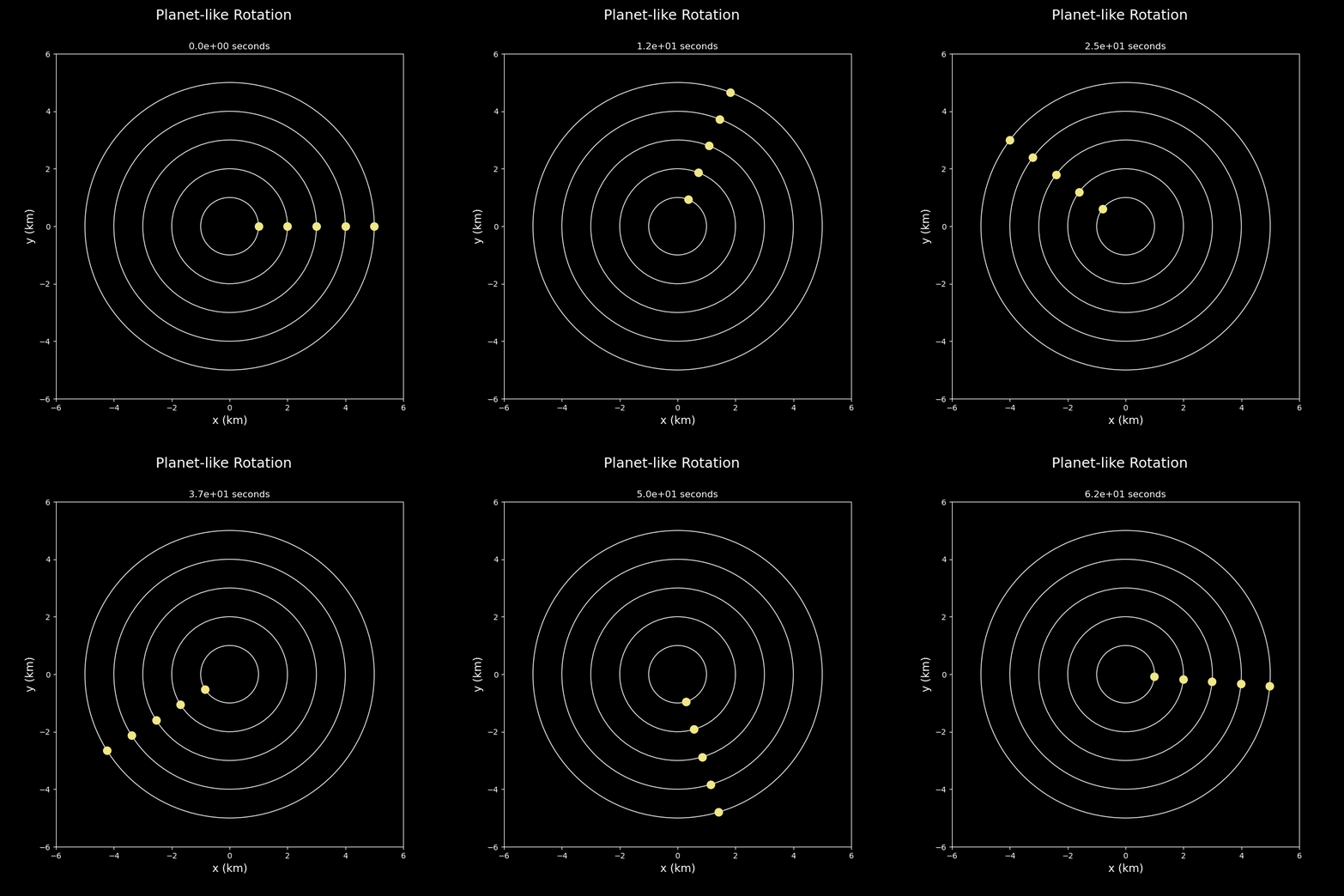
rc_animation
A module for generating animations for explaining fundamental rotation curves concepts.
ToC: Functions
|
Calculates positions of multiple objects around a circle after some time with interval dt. |
|
Calculates transposed positions of multiple objects around a circle after some time with interval dt. Setup for the animation. |
|
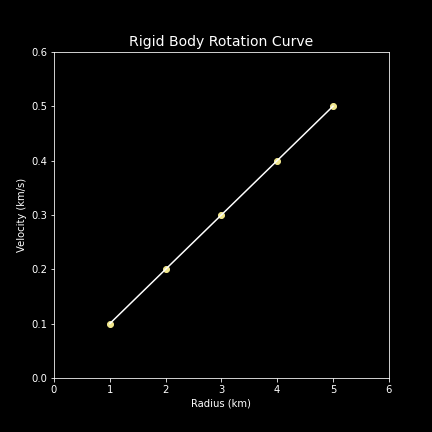
Plot rotation curve, given the radius and velocity. |
|
Animation of rotating objects around a circle. |
ToC: Attributes
Members
- rc_animation.px
- rc_animation.CalculatePosition(radius, velocity, time, dt)
Calculates positions of multiple objects around a circle after some time with interval dt.
Any set of units may be used, provided they match – for example, if using a radius of meters and time in seconds, velocity should be in meters per second and the time increments should be in seconds.
- Parameters:
- radius[array]
Radius of the objects from the center. Units to match velocity.
- velocity[array]
Velocity of the objects. Units to match radius and time. Length must match length of radius.
- time[int]
Maximum time. Units to match velocity. If not divisible by dt, the final time provided may exceed this value by a number less than dt.
- dt[int]
Time increment. Units to match time.
- Returns:
Two [ndarray]s of x-position (first array) and y-position (second array) of all objects. These arrays are stored such that each row represents a single time and each column represents a single object. [1darray] of associated time.
- Example:
>>> import numpy as np #To generate the arrays
>>> radius = np.array([1,2,3,4,5])              # in m
>>> velocity = np.array([0.1,0.2,0.3,0.4,0.5])  # in m/s
>>> time = 100                                  # in s
>>> dt = 33                                     # in s
>>> CalculatePosition(radius,velocity,time,dt)
(array([[ 1.        ,  2.        ,  3.        ,  4.        ,  5.        ],
    [-0.98747977, -1.97495954, -2.96243931, -3.94991908, -4.93739885],
    [ 0.95023259,  1.90046518,  2.85069778,  3.80093037,  4.75116296],
    [-0.88919115, -1.77838231, -2.66757346, -3.55676461, -4.44595576],
    [ 0.80588396,  1.61176792,  2.41765187,  3.22353583,  4.02941979]]),
array([[ 0.        ,  0.        ,  0.        ,  0.        ,  0.        ],
    [-0.15774569, -0.31549139, -0.47323708, -0.63098278, -0.78872847],
    [ 0.31154136,  0.62308273,  0.93462409,  1.24616545,  1.55770682],
    [-0.45753589, -0.91507179, -1.37260768, -1.83014358, -2.28767947],
    [ 0.59207351,  1.18414703,  1.77622054,  2.36829406,  2.96036757]]),
array([  0,  33,  66,  99, 132]))
- rc_animation.MultiplePositions(radius, velocity, time, dt)
Calculates transposed positions of multiple objects around a circle after some time with interval dt. Setup for the animation.
Any set of units may be used, provided they match – for example, if using a radius of meters and time in seconds, velocity should be in meters per second and the time increments should be in seconds.
- Parameters:
- radius[array]
Radius of the objects from the center. Units to match velocity.
- velocity[array]
Velocity of the objects. Units to match radius and time. Length must match length of radius.
- time[int]
Maximum time. Units to match velocity. If not divisible by dt, the final time provided may exceed this value by a number less than dt.
- dt[int]
Time increment. Units to match time.
- Returns:
Two [ndarray]s of x-position (first array) and y-position (second array) of all objects. These arrays are stored such that each row represents a single object and each column represents a single time. [1darray] of associated time.
- Example:
>>> radius = np.array([1,2,3,4,5])              # in m
>>> velocity = np.array([0.1,0.2,0.3,0.4,0.5])  # in m/s
>>> time = 100                                  # in s
>>> dt = 50                                     # in s
>>> MultiplePositions(radius,velocity,time,dt)
(array([[ 1.        ,  0.28366219, -0.83907153],
    [ 2.        ,  0.56732437, -1.67814306],
    [ 3.        ,  0.85098656, -2.51721459],
    [ 4.        ,  1.13464874, -3.35628612],
    [ 5.        ,  1.41831093, -4.19535765]]),
array([[ 0.        , -0.95892427, -0.54402111],
    [ 0.        , -1.91784855, -1.08804222],
    [ 0.        , -2.87677282, -1.63206333],
    [ 0.        , -3.8356971 , -2.17608444],
    [ 0.        , -4.79462137, -2.72010555]]),
array([ 0, 50]))
- rc_animation.PlotRotationCurve(radius, velocity, title, xlabel='Radius (km)', ylabel='Velocity (km/s)', xlim=1, ylim=0.1)
Plot rotation curve, given the radius and velocity.
Any set of units may be used, provided they match – for example, if using a radius of meters, velocity should be in meters per unit time and the labels should correctly indicate both.
- Parameters:
- radius[array]
Radius of the objects from the center. Units to match velocity.
- velocity[array]
Velocity of the objects. Units to match radius and time. Length must match length of radius.
- title[string]
Title of the plot.
- xlabel[string]
X-label of the plot.
- default:
‘Radius (km)’
- ylabel[string]
Y-label of the plot.
- default:
‘Velocity (km/s)’
- xlim[float]
X-limit of the plot.
- default:
1
- ylim[float]
Y-limit of the plot.
- default:
0.1
- Returns:
None
- Example:
>>> radius = np.array([1,2,3,4,5])              # in m
>>> velocity = np.array([0.1,0.2,0.3,0.4,0.5])  # in m/s
>>> PlotRotationCurve(radius,velocity,'Rigid Body Rotation Curve')
- rc_animation.MakeAnimation(radius, velocity, time, dt, filename, title, xlim=1, ylim=1, size=False, masses=None)
Animation of rotating objects around a circle.
Any set of units may be used, provided they match – for example, if using a radius of meters and time in seconds, velocity should be in meters per second and the time increments should be in seconds.
- Parameters:
- radius[array]
Radius of the objects from the center. Units of km.
- velocity[array]
Velocity of the objects. Units to match time with radial units of km. Length must match length of radius.
- time[int]
Maximum time. Units to match velocity. If not divisible by dt, the final time provided may exceed this variable by a number less than dt.
- dt[int]
Time increment. Units to match time.
- filename[string]
File name to save animation.
- title[string]
Title of the plot.
- xlim[float]
X-limit of the plot.
- default:
1
- ylim[float]
Y-limit of the plot.
- default:
0.1
- size[bool]
Size of dots, based on masses. If True, the sizes of dots depend on masses.
- default:
False
- masses[array]
Masses of objects, when needed.
- default:
None
- Returns:
None
- Example:
>>> radius = np.array([1,2,3,4,5])              # in m
>>> velocity = np.array([0.1,0.2,0.3,0.4,0.5])  # in m/s
>>> time = 100
>>> dt = 1
>>> MakeAnimation(radius, velocity, time, dt,
...     filename='images/solarsystem.gif',
...     title='Planet-like Rotation')